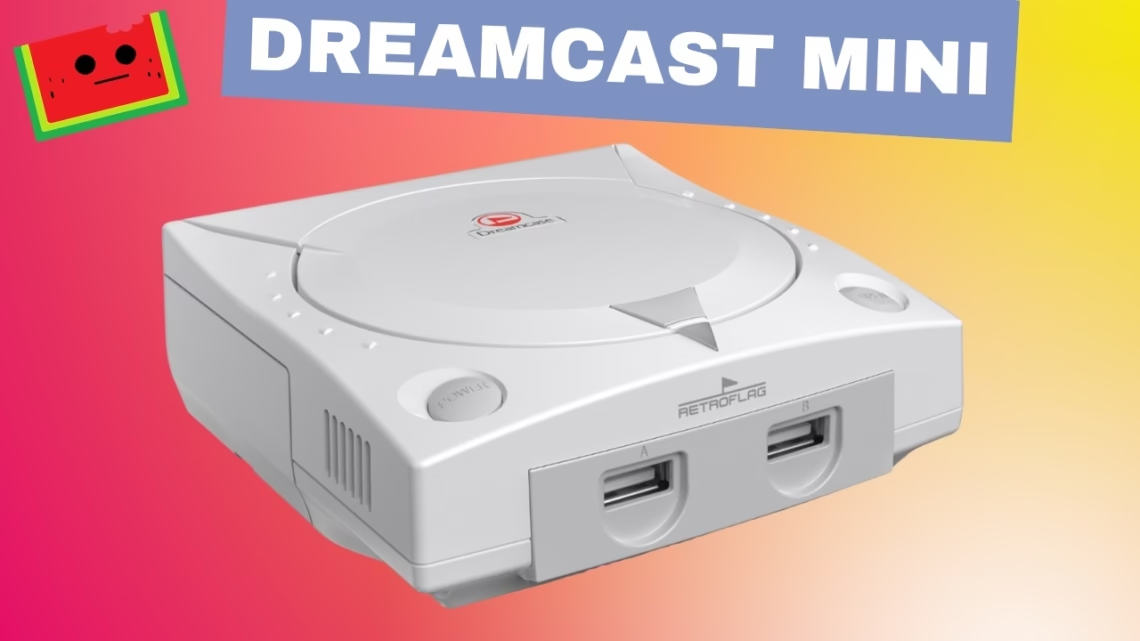
Sega never released a Dreamcast Mini, and that still feels strange. The Dreamcast is iconic and seems like the perfect console for a Mini version. So instead of waiting for something that may never happen, we built our own, keeping the look, feel and experience as close to the original as possible.
We bought the case with our own money. Nothing was sent to us and this isn’t sponsored.
What you need
- A Retroflag Dream Case made for the Raspberry Pi 5. We bought ours on AliExpress for around $32 at the time of the build. Shipping takes longer than Amazon, but for the price and the design it’s hard to complain. The case looks and feels like a scaled-down Dreamcast
- A Raspberry Pi 5. Any RAM size works, and we used the 8GB model
- A microSD card
- Controllers
- Standard power and HDMI cables
The build: a reality check
The finished result looks great, but getting there was harder than we expected. The parts aren’t complicated, but the instructions weren’t very clear. At several points you’re working with cables dangling everywhere while trying to close the case, line everything up and avoid pinching anything. We had to stop, open everything back up and re-route cables. It takes patience. That’s honest feedback from the build, not a sponsored opinion.
Software: Batocera
We used Batocera as the operating system. It’s lightweight and designed for emulation, and on the Raspberry Pi 5 it performs very well for Dreamcast games. No desktop runs, and it boots straight into a console-style interface.
Making it feel like a Dreamcast Mini
- Only Dreamcast games on the system, with no other systems and no distractions
- The Artflix Cobalto theme, which has a Dreamcast-inspired look
- System music disabled, bezels removed and transitions off when launching games
- Games scraped for box art and metadata
None of this is required. We did it to push the build as close as possible to what an official Dreamcast Mini might have felt like.
Transferring games over SMB
Batocera’s default hostname is batocera, and we renamed ours dreamcastmini. The default username is root and the password is linux. You can change them. If the hostname doesn’t resolve on your network, connect using the Batocera IP address.
Performance
With our Batocera and Flycast settings, SoulCalibur, Sega Rally 2, Gunbird, Dynamite Cop and Daytona USA ran smoothly at 60 frames per second. Going back to Sega Rally 2 felt like being back in the arcade. Jet Grind Radio and Hydro Thunder, typically 30fps titles, also ran great.
Controls felt responsive even over Bluetooth. We tested with the 8BitDo Pro 3 and landed hadokens, shoryukens and tatsumaki senpukyaku without trouble. That’s not a lab test, but it’s a good real-world sign that the input timing feels right.
Fan noise, auto-resume and the power button
- The fan is a bit noticeable in a quiet room. It isn’t loud or annoying, but you can hear it. We included an audio recording in the video so you can decide
- Auto-resume jumps you straight back into a game where you left off, which feels modern and convenient
- The power button is a click-style hardware switch that controls power to the unit and feels like a real console switch
Verdict
This really does look like a Dreamcast Mini. The custom PCB inside the case makes everything work smoothly with the Raspberry Pi 5, and once it’s built and powered on the experience is smooth, stable and very console-like. Our biggest wish is clearer instructions and an easier build. If you’re patient during assembly, the end result is worth it for Dreamcast fans who always wanted a Mini console.